Said in full
“Turn with me to Romans chapter 8, verse 28, and let's read it together”
Romans 8:28
And we know that all things work together for good to those who love God, to those who are the called according to His purpose.
Romans 8:28 NKJV
Live scripture for church screens
Quick Verse listens to the sermon and sends every verse to the ProPresenterProPresenter you already use, the moment it's spoken. Nothing to replace, no references to type, no scrambling mid-sermon.
14 days or 5 hours of listening free. No card needed.
 ProPresenter
 FreeShow
 OBS Studio
 vMix
vMix
Alongside, not instead
Your church has spent years getting its presentation software just right: the themes, the lower thirds, the run sheets, the volunteers who know it inside out. Quick Verse doesn't replace any of it. It sits next to the software you already use, listens to the sermon, and hands it each verse as it's read.
The sermon
From your sound desk or a mic
Quick Verse
Hears the reference, finds the verse
Your presentation software
Same themes, same setup
Your screens
Projector, TVs and livestream
Verses arrive in the lower thirds and styles you've already designed. Nothing to rebuild, nothing to re-learn.
Songs, notices, videos and run sheets carry on exactly as they do now. Quick Verse only handles the scripture.
No new presentation software to move to and no Sunday-morning switchover. Turn it off and everything works as before.
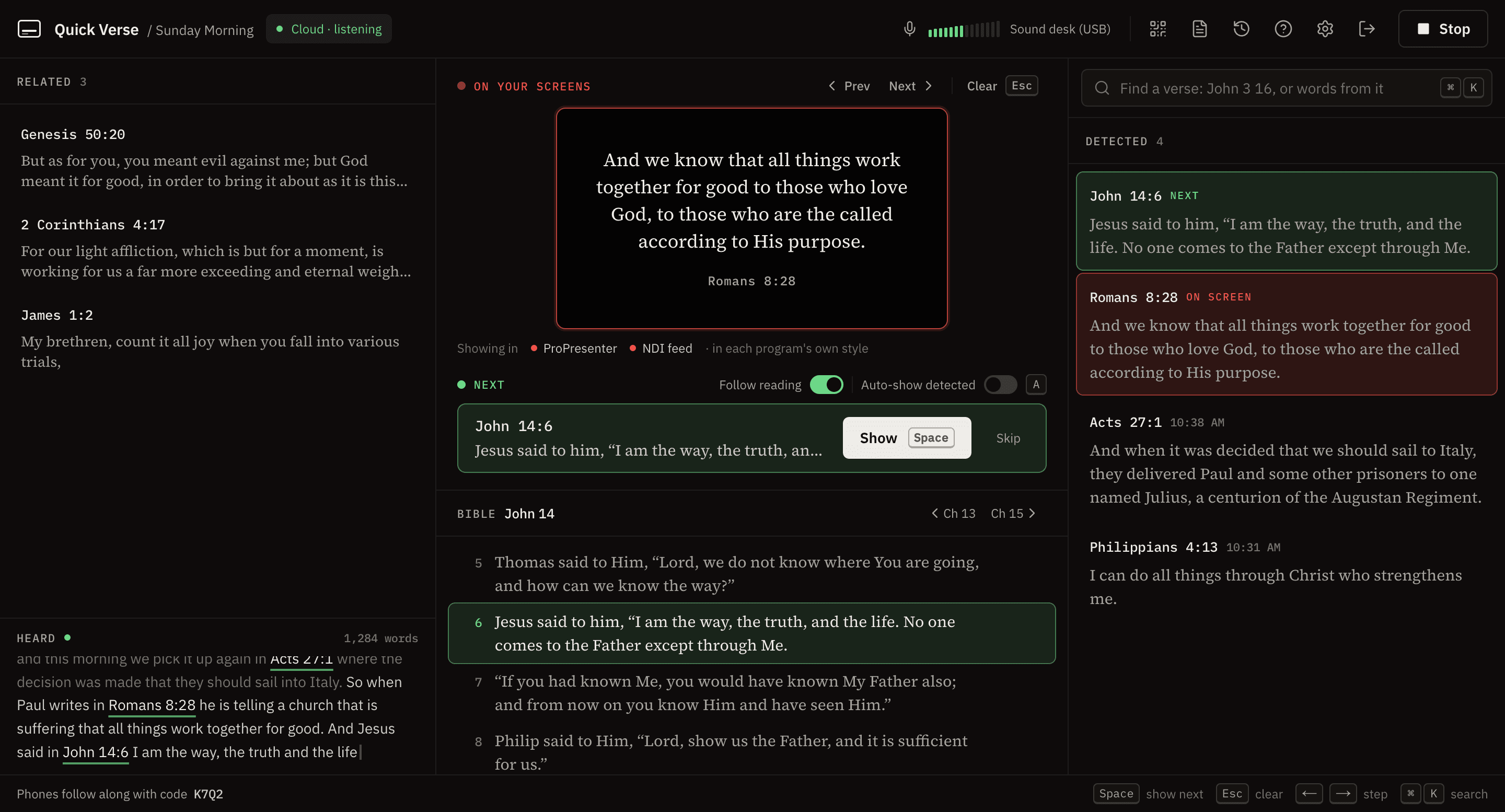
The console
One screen shows what the congregation sees, what's up next, every verse detected and the whole chapter. Red means it's on screen, green means it's ready. Run the service from the keyboard: Space to show, Esc to clear.
What it hears
Not just neat references. Shorthand, “the next verse”, a quote from memory or a reading from another translation all land on the right verse, shown in yours.
Said in full
“Turn with me to Romans chapter 8, verse 28, and let's read it together”
And we know that all things work together for good to those who love God, to those who are the called according to His purpose.
Romans 8:28 NKJV
Said quickly
“As it says in First Corinthians thirteen four, love is patient”
Love suffers long and is kind; love does not envy; love does not parade itself, is not puffed up;
1 Corinthians 13:4 NKJV
The next verse
“And then verse 5 goes on to tell us what love doesn't do”
does not behave rudely, does not seek its own, is not provoked, thinks no evil;
1 Corinthians 13:5 NKJV
Quoted from memory
“You know this one. For God so loved the world that he gave his only son”
For God so loved the world that He gave His only begotten Son, that whoever believes in Him should not perish but have everlasting life.
John 3:16 NKJV
From another translation
“Paul says I can do everything through Christ, who gives me strength”
I can do all things through Christ who strengthens me.
Philippians 4:13 NKJV
Read aloud
“…the Lord is my shepherd, I shall not want. He makes me lie down in green pastures…”
He makes me lie down in green pastures; He leads me beside the still waters.
Psalm 23:2 NKJV
How it works
A feed from your sound desk (or any microphone) goes into the computer running your screens. Quick Verse writes out what's said as it's said.
References like “Romans 8 and verse 28”, the next verse, and quotations read without a reference, even when the wording isn't exact.
Into FreeShow, ProPresenter, EasyWorship, OBS, vMix or a second screen. You stay in control: verses can wait in Next until you press Space.
Integrations
Keep your themes, your slides and your setup. The desktop app finds your presentation software for you: no addresses, no plugins, nothing to type.
ProPresenterFound on this computer or your network. Each verse goes into a Quick Verse message on your scripture lower third.
Add the Quick Verse feed as a live video layer and verses appear over whatever's on screen.
 FreeShow
Connects by itself, on this computer or anywhere on the network. Verses go straight into the show.
OBS StudioOne browser source and verses appear over your livestream, styled to match.
 vMix
vMixBring verses in as a web browser input or through the NDI feed.
Any switcher or screen that takes NDI gets a clean full-HD verse feed called “Quick Verse”.
No presentation software? Plug in a projector or TV and Quick Verse shows verses full screen by itself. Product names and logos are trademarks of their owners and don't imply endorsement. NDI® is a registered trademark of Vizrt NDI AB.
Features
Catches “John chapter 3 verse 16”, “verse 18”, “the next verse”, and passages quoted from memory, with related verses alongside.
When the preacher reads a passage aloud, each next verse goes up as they finish the one before. Commentary in between doesn't move it.
Detected verses wait in Next until you press Space, or turn on auto-show. A picture of your screens is always in front of you.
Offline mode runs on the church's own computer. If the Wi-Fi drops mid-service, Quick Verse carries on.
Every volunteer gets their own login, sharing one history of services. Invite them with a link.
Show verses in the NKJV, KJV or ASV, whichever your church reads from.
Show a QR code. Everyone can read each verse at their own pace, with larger text if they need it.
Notes written from the service's transcript and the verses shown, ready to share.
Pricing
Less than a coffee a month, however many people run the screens. No card to start, and nothing is charged automatically.
START HERE
14 days or 5 hours of listening, whichever comes first.
£0
AFTER YOUR TRIAL
Unlimited listening for your church.
£5 / month
Cancel any time. Nothing is charged until you choose to.
Questions
In our tests on real sermons it detects the large majority of verses that are named or read. Clear sound matters most, so use a feed from your sound desk if you can. Nothing goes on screen without your say-so unless you switch on auto-show.
No, and it's not meant to. Keep ProPresenter, EasyWorship, FreeShow, OBS or vMix exactly as you've set them up, with your themes, lower thirds and run sheets. Quick Verse finds them on your computer or network and sends each verse in, so your team carries on as normal and the scripture is simply there when it's read. No software at all? It can show verses on a second screen by itself.
It works best online. With offline mode set up in the desktop app, it runs on your own computer and keeps going if the internet drops.
No. The audio is turned into text as it's spoken and then discarded. Transcripts aren't saved, and your services are never used to train AI.
NKJV, KJV and ASV today, chosen in Settings. Verses are recognised whichever translation the preacher reads from.
Everything, for 14 days or 5 hours of listening, whichever comes first. No card is needed, and nothing is charged automatically when it ends.
The desktop app runs on Mac (Apple Silicon and Intel) and Windows. You can also try Quick Verse in a web browser.
Create an account, run the two-minute setup, and press Start when the sermon begins.